
Zetaris pipelines are used to transform structured and unstructured data into a desired state for either real-time use-cases or for moving data into a data warehouse or data lakehouse.
When moving data, rather than having to manually run them, we can use the Zetaris Scheduler, which leverages Apache Airflow, to automate and schedule these pipeline flows.
How to setup a schedule
In creating the schedule, there are key steps for the creation
2. Access the Zetaris Scheduler
3. Build the DAG pipeline script
The DAG pipeline script is where we build the logic for how to orchestrate the pipeline. It is where we include things like schedule cycle, pipeline/s to call, and the authentication mechanism
1. Collect Zetaris Details
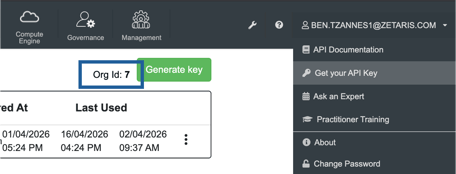
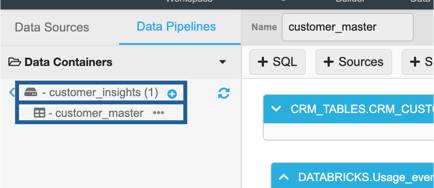
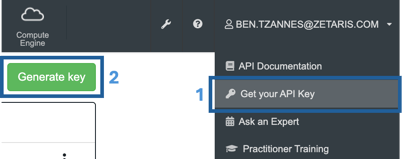
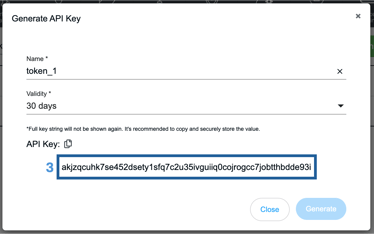
We need to collect some information from the Zetaris hub to include in the orchestration, these include Org_ID, the pipeline name, and the bearer token, check below for examples of where to find each
-
Org_ID
example: 7
-
Pipeline name (with container)
example: customer_insights.customer_master
-
Bearer Token
example: akjzqcuhk7se452dsety1sfq7c2u35ivguiiq0cojrogcc7jobtthbdde93i
2. Access the Zetaris Scheduler
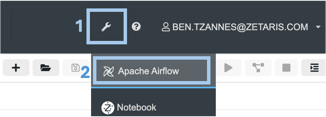
Select the Apache Airflow integration from the top panel
3. Build the DAG pipeline script
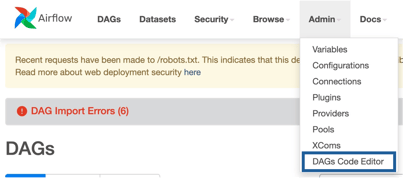
Step 1: Create a new DAG by going to Admin > DAGs Code Editor then select +New
Step 2: Create a new DAG script
Below are example scripts that is used to create a DAG schedule, which you can copy and paste into your DAG editor. There are two examples,
- One for a single pipeline schedule
- One for a multi pipeline schedule
Once that is done you need to update the following fields
"X-Org-ID": "<Your Org ID>"
"Authorization": "Bearer <your Bearer Token>"
"sql" : "SELECT * FROM <pipeline_container.pipeline_name>"
The "sql" field for updating is towards the end of the script.
For multipipeline DAG schedules you will need to update the the "sql" field in both run_query_task_* locations
"schedule_interval" : "<your preferred interval>"
The "schedule_interval" field uses CRON notation. e.g. "0 2 * * *" schedules a task to run at 2am UTC every day
Optional Updates:
dag_id="<name of the DAG>"
task_id="<name of the schedule task>"
Step 3: Save script
EXAMPLE SCRIPT - SINGLE PIPELINE EXECUTION (FOR COPY)
from airflow import DAG
from airflow.operators.python import PythonOperator
from datetime import datetime
import requests
import json
import logging

import pandas as pd


# ---------------- CONFIG ----------------
URL = "https://api.enterprise.zetaris.com/api/v1.0/sql-editor/sqls/run-query"

HEADERS = {
    "X-Request-ID": "f9fb18eb-e225-4af4-a7fa-355375628a38",
    "X-Org-ID": "7",
    "Content-Type": "application/json",
    "Authorization": "Bearer akjzqcuhk7se452dsety1sfq7c2u35ivguiiq0cojrogcc7jobtthbdde93i",
}


# ---------------- TASK FUNCTION ----------------
def run_zetaris_query(sql):
    logging.info("🚀 Running Zetaris SQL Query...")

    payload = json.dumps({
        "sql": sql
    })

    try:
        response = requests.post(URL, headers=HEADERS, data=payload)

        logging.info(f"Status Code: {response.status_code}")
        logging.info(f"Response: {response.text}")

        return response.json()

        # ❗ Fail task if API fails
        if response.status_code != 200:
            raise Exception(f"API failed with status {response.status_code}")

        # Optional: check logical failure
        if "error" in response.text.lower():
            raise Exception(f"API returned error: {response.text}")

    except Exception as e:
        logging.error(f"❌ Error running Zetaris query: {e}")
        raise


### Query the zetaris API here
def get_sql(sql):
    sql = run_zetaris_query(sql)

    df = pd.DataFrame(sql["data"], columns=sql["headers"])
    print(df.head())

    return sql


with DAG(
    dag_id="test",
    start_date=datetime(2025,11,25),
    schedule_interval="0 2 * * *",  # scheduled at 2am UTC every day
    catchup=False,
    tags=["demo"]
) as dag:

    run_query_task_1 = PythonOperator(
        task_id="run_zetaris_sql_1",
        python_callable=get_sql,
        op_kwargs={
            "sql": "SELECT * FROM customer_insights.customer_master"}
    )

    run_query_task_1
EXAMPLE SCRIPT - MULTIPLE PIPELINE EXECUTION (FOR COPY)
from airflow import DAG
from airflow.operators.python import PythonOperator
from datetime import datetime
import requests
import json
import logging

import pandas as pd


# ---------------- CONFIG ----------------
URL = "https://api.enterprise.zetaris.com/api/v1.0/sql-editor/sqls/run-query"

HEADERS = {
    "X-Request-ID": "f9fb18eb-e225-4af4-a7fa-355375628a38",
    "X-Org-ID": "7",
    "Content-Type": "application/json",
    "Authorization": "Bearer akbr6ziubbibvbbxzpxp2wwt94tl1dklxmts9paslgddes9kmgpautuybi2m",
}


# ---------------- TASK FUNCTION ----------------
def run_zetaris_query(sql):
    logging.info("🚀 Running Zetaris SQL Query...")

    payload = json.dumps({
        "sql": sql
    })

    try:
        response = requests.post(URL, headers=HEADERS, data=payload)

        logging.info(f"Status Code: {response.status_code}")
        logging.info(f"Response: {response.text}")

        return response.json()

        # ❗ Fail task if API fails
        if response.status_code != 200:
            raise Exception(f"API failed with status {response.status_code}")

        # Optional: check logical failure
        if "error" in response.text.lower():
            raise Exception(f"API returned error: {response.text}")

    except Exception as e:
        logging.error(f"❌ Error running Zetaris query: {e}")
        raise


### Query the zetaris API here
def get_sql(sql):
    sql = run_zetaris_query(sql)

    df = pd.DataFrame(sql["data"], columns=sql["headers"])
    print(df.head())

    return sql


with DAG(
    dag_id="test",
    start_date=datetime(2025,11,25),
    schedule_interval="0 2 * * *",  # scheduled at 2am UTC every day
    catchup=False,
    tags=["demo"]
) as dag:

    run_query_task_1 = PythonOperator(
        task_id="run_zetaris_sql_1",
        python_callable=get_sql,
        op_kwargs={
            "sql": "SELECT * FROM ny_taxi_csv.taxi_zones_csv"}
    )

    run_query_task_2 = PythonOperator(
        task_id="run_zetaris_sql_2",
        python_callable=get_sql,
        op_kwargs={
            "sql": "SELECT * FROM ny_taxi_csv.for_hire_vehicles_csv"}
    )

    run_query_task_1 >> run_query_task_2
Inspect the DAG
Navigate back to the main screen by select DAGs from the top, then your DAG should appear in the list below
NOTE: It may not appear straight away, in which case you may need to refresh a few times
Select your DAG to inspect logs, history, and for manual triggering